Version: 1.0.0
Built on Unity 6000.2. Nothing in the code requires anything past plain C# 8/9, so it may well work on older LTS releases too, but that hasn’t been tested and isn’t guaranteed.
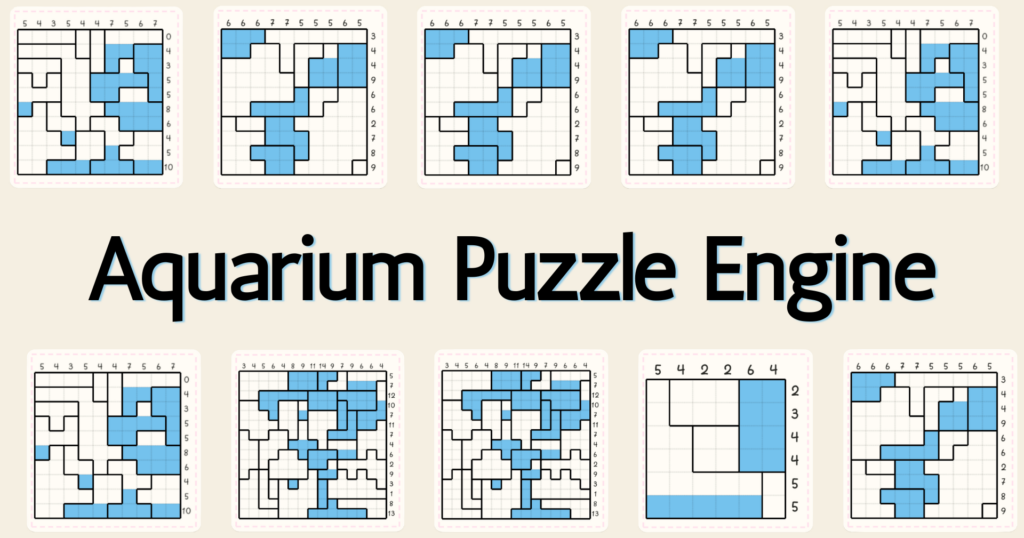
Aquarium Puzzle Engine is a self-contained Unity framework for Aquarium logic puzzles. It includes random puzzle generation, solver-based validation, authored puzzle assets, level collections, runtime play logic, and Editor authoring tools. It does not include game menus, UI prefabs, animations, economies, saves, ads, or a visual skin.
Don’t want to write C#? Skip ahead to the No-Code Integration sample (Package Manager → this package → Samples), then follow No-Code Setup for a full menu + gameplay setup wired entirely through the Inspector.
Contents
- Install and open the demo
- Core concepts
- Generate and play a puzzle
- Background generation
- Cancellation and restart
- Mobile performance
- Author levels and collections
- Content validation
- Progression: thematic order and economy config
- Troubleshooting and limitations
- Support
Install and open the demo
- Add the package to a Unity project through the Package Manager or as an embedded package.
- In the Package Manager, open this package’s Samples tab and import Demo (or use
Tools > Aquarium > Welcome & Setup, which has the same Import button). This copies the sample
intoAssets/Samples/Aquarium Puzzle Engine/.../Demo/— it isn’t part of the package until imported. - Open the imported
DemoScene.unity(in the Demo sample’sScenes/folder). - Enter Play Mode.
DemoScene.unity is intentionally implemented with IMGUI to show raw core logic without any
dependencies: generate a board, solve it by clicking the grid, validate it with the solver, or
load an authored level from a collection.
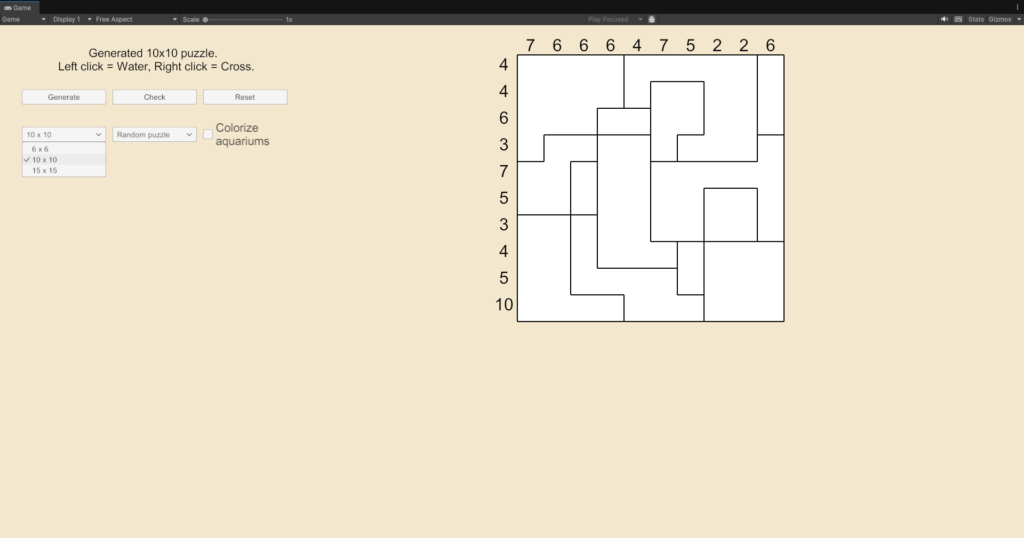
For a production-ready starting point, open UGUIDemoScene.unity from the same Demo sample. It provides a clean, standard Canvas-based UI implemented in Runtime/Scripts/View/ that demonstrates how to render the grid, cells, and clues using Unity UI (UnityEngine.UI). You can use this as a template to build your own visual presentation.
UGUI demo controls
UGUIDemoScene comes pre-wired with three optional standard uGUI controls on AquariumPuzzleUGUIDemo:
| Control | Component field | Behaviour |
|---|---|---|
| Board size selector | Board Size Dropdown | Offers 6×6, 10×10, and 15×15. Choose a size, then press Generate. |
| Authored level selector | Level Dropdown | Offers a random puzzle followed by levels from the bundled demo registry; the project registry is a fallback. |
| Region color setting | Region Colors Toggle | Shows or hides the region color fill without changing puzzle data or region borders. |
The bundled demo levels show up with no setup needed. If you also want your own project-level collections in that selector, run Tools > Aquarium > Project Setup > Sync Project Level Collection Registry after adding or removing them, then restart the scene.
Core concepts
| Type | Responsibility |
|---|---|
AquariumPuzzleAsset | ScriptableObject for an authored board, clues, regions, author solution, visual data, and difficulty metadata. |
AquariumPuzzlePlayField | Pure interactive model. It applies water gravity, crosses, mistake checks, and completion checks. Render this model with any UI system. |
AquariumPuzzleSolver | Validates raw board data, determines solvability, counts solutions, and returns the first solution. |
AquariumRandomPuzzleGenerator | Builds a unique random board for any size from 5×5 up to 30×30. Can optionally target an AquariumPuzzleDifficulty (best effort). |
AquariumRandomPuzzleRuntimeSession | Serializable generated-board data used to create a play field. |
AquariumLevelCollection | Ordered list of authored puzzle assets. |
AquariumLevelCollectionRegistry | Collection lookup by stable ID or display name. |
Puzzle data flow
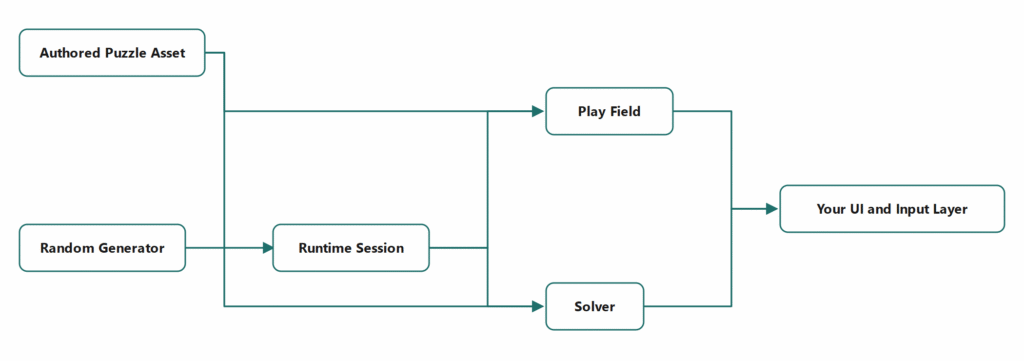
Your UI owns rendering, input feedback, animation, and screen navigation. The engine owns puzzle rules and data only.
Generate and play a puzzle
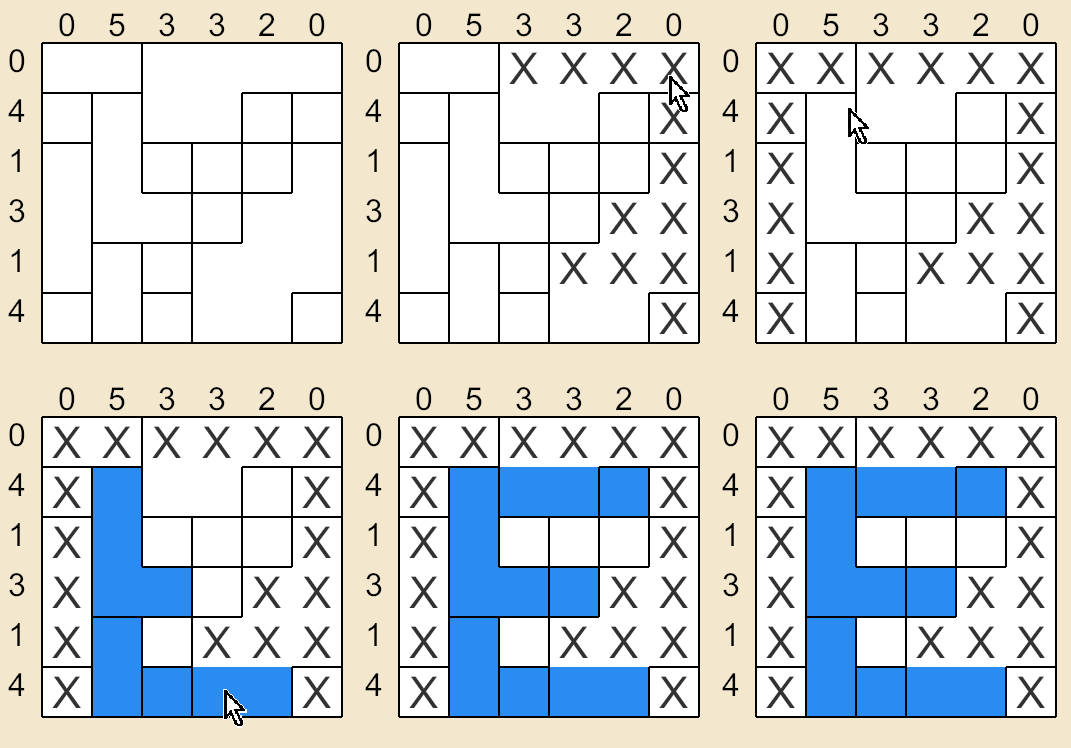
Generate a board, then load the resulting session into AquariumPuzzlePlayField.
using System;
using Aquarium.Puzzle;

var random = new Random(12345);
bool generated = AquariumRandomPuzzleGenerator.TryGenerate(
    width: 10,
    height: 10,
    attempts: 60,
    random,
    out AquariumRandomPuzzleRuntimeSession session);

if (!generated)
{
    return;
}

var field = new AquariumPuzzlePlayField(session);
field.Toggle(3, 4, AquariumPuzzlePlayField.PaintTool.Water);
field.Toggle(1, 0, AquariumPuzzlePlayField.PaintTool.Cross);

int mistakes = field.CheckMistakes();
bool solved = field.IsSolved;
Use a fixed seed to reproduce a board during debugging. Two generator calls that receive new System.Random instances with the same seed produce equivalent board data. SessionId is intentionally unique and must not be used when comparing deterministic results.
Background generation
AquariumPuzzleSolver.ValidateAndSolve accepts raw arrays and does not access UnityEngine.Object. AquariumRandomPuzzleGenerator.TryGenerate also works on data values and can run in a background task.
Do not create, read, mutate, or destroy Unity objects from that task. This includes GameObject, MonoBehaviour, ScriptableObject, Texture, UnityEngine.Random, UI controls, and scene state. Capture only value inputs on the main thread, generate in the background, then load the completed session into the play field and update UI on the main thread.
using System;
using System.Threading.Tasks;
using Aquarium.Puzzle;
using UnityEngine;

public sealed class PuzzleGenerationController : MonoBehaviour
{
    private int requestVersion;
    private AquariumPuzzlePlayField field;

    public async void Generate(int width, int height, int seed)
    {
        int version = ++requestVersion;

        AquariumRandomPuzzleRuntimeSession session = await Task.Run(() =>
        {
            var random = new Random(seed);
            AquariumRandomPuzzleGenerator.TryGenerate(
                width,
                height,
                attempts: 60,
                random,
                out AquariumRandomPuzzleRuntimeSession generatedSession,
                timeBudgetMs: 1500);
            return generatedSession;
        });

        // This code resumes on Unity's main synchronization context.
        if (this == null || version != requestVersion || session == null)
        {
            return;
        }

        field = new AquariumPuzzlePlayField(session);
        RefreshBoardUI(field);
    }

    private void RefreshBoardUI(AquariumPuzzlePlayField playField)
    {
        // Create or update Unity UI here, on the main thread only.
    }
}
Do not share one System.Random instance between concurrent generation tasks. Give each request its own instance with its own seed.
Cancellation and restart
The current generator does not accept a CancellationToken, so it cannot stop in the middle of an individual generation attempt. Use two complementary controls:
- Set
timeBudgetMsto bound the time an individual background request can spend searching. - Increment a request version whenever the player changes board size, starts a new puzzle, or leaves the screen. Ignore a result whose version is no longer current.
The requestVersion check in the previous example implements the second rule. Calling Generate again does not forcibly abort the old task; it makes its eventual result harmless. This is the recommended behaviour for the current API.
For an explicit restart button:
public void RestartGeneration(int width, int height)
{
    int seed = Environment.TickCount;
    Generate(width, height, seed);
}

private void OnDisable()
{
    requestVersion++;
}
OnDisable invalidates a completed result after its owning screen has gone away. It does not cancel CPU work already in progress; keep timeBudgetMs conservative for the target device.
Mobile performance
Generation is CPU work. It is safe to use on mobile when it runs outside the main thread and has a clear time budget.
| Board size | Recommended use | Starting attempts | Suggested background time budget |
|---|---|---|---|
| 5×5 – 6×6 | First-session play, frequent refreshes, low-end devices | 40–60 | 250–500 ms |
| 7×7 – 10×10 | Standard gameplay | 60–120 | 750–1500 ms |
| 11×11 – 15×15 | Advanced mode or pre-generated content | 120–180 | 1500–3000 ms |
| 16×16 – 30×30 | Loading-screen or pre-generation only; ship curated authored levels when possible | 180+ | 3000–8000 ms |
These are starting values, not performance guarantees. Profile representative Android and iOS hardware and adjust according to your loading UX.
Recommended mobile integration:
- Pre-generate the next board while the player is solving the current board or viewing a result screen.
- Show an indeterminate loading state while a requested board is being generated; do not block input or the Unity main thread.
- Reuse the generated
AquariumRandomPuzzleRuntimeSessioninstead of generating again when the player reopens the same board. - Treat 15×15 generation as a background or loading-screen operation. For predictable pacing, ship curated
AquariumPuzzleAssetlevels. - Use a time budget and the version-guarded restart pattern described above.
- Profile with Development Build on physical devices. Editor timings do not represent mobile hardware.
Author levels and collections
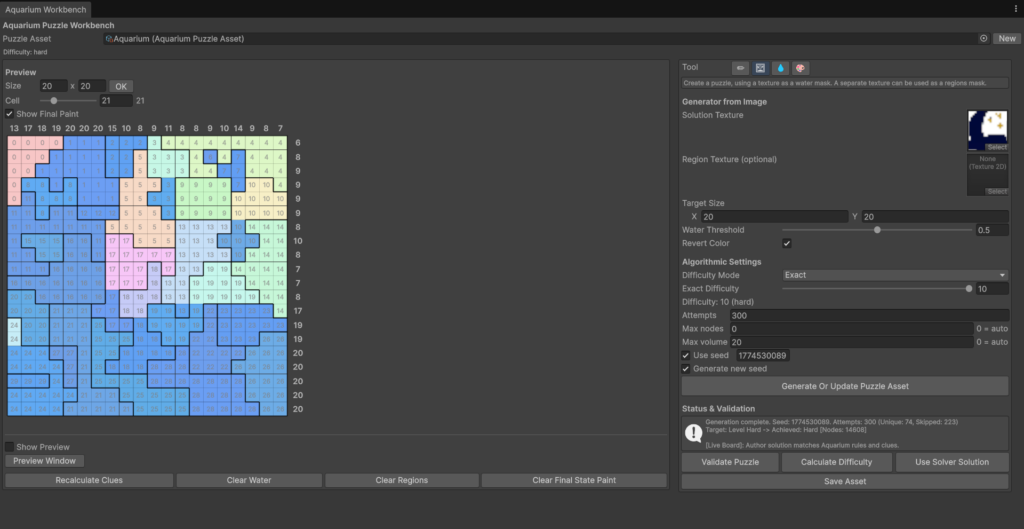
Create an authored level through Assets > Create > Aquarium > Puzzle Asset, or open the Aquarium workbench via Tools > Aquarium > Puzzle Workbench.
The workbench offers four distinct tools (modes) for creating puzzles:
- Manual (✏): Draw regions and paint the intended water mask by hand.
- Region Palette: Add a new empty region with + Region. Remove a region by clicking its X Button (subsequent region IDs shift down automatically to maintain continuous numbering).
- Generate from Texture (🖼): Create a puzzle automatically from a solution texture (required) and an optional region texture.
- Solution texture only: pixel luminance decides water vs. no-water (invert with Invert Luminance, tune the cutoff with Water Threshold). Regions are then built automatically around the resulting water shape, using the same algorithm as Generate from Water.
- Both textures: the solution texture still drives the water mask, and the region texture is sampled directly — each distinct pixel color becomes one region.
- This mode writes
AuthorWaterMask/RegionIds(andRegionColors, when a region texture is supplied) only. It does not read pixel colors intoFinalPaintColors. For a full-color reveal, repaint the level in Final State mode afterward, or setFinalPaintMask/FinalPaintColorsyourself through the authoring API — auto-capturing sprite colors during generation is a planned improvement, not implemented yet.
- Generate from Water (💧): Draw the intended water mask directly on the grid, then click “Generate Regions From Water” to let the engine build valid regions around your water placement.
- Final State (🎨): Paint a final pixel-art solution that is revealed only when the player completes the puzzle. This is currently the only way to set
FinalPaintMask/FinalPaintColors— painting here is manual, per-cell, and independent of whatever texture (if any) you used to generate the puzzle.
In all modes, the workbench provides a live preview grid where you can test solving your puzzle. The inspector at the bottom displays real-time validation from the built-in solver (checking for multiple solutions, disconnected regions, and incorrect water levels).
How the final-state reveal reaches the player
Painting a final state in the workbench only stores data (AquariumPuzzleAsset.FinalPaintMask/FinalPaintColors). Showing it to the player at runtime takes one more step:
AquariumPuzzlePlayField.Load(AquariumPuzzleAsset)copies that data in and setsHasFinalPictureto true if any cell was painted. Random boards never have final-paint data, soHasFinalPicturestaysfalsefor sessions loaded throughLoad(AquariumRandomPuzzleRuntimeSession)or the rawLoad(...)overloads.AquariumPuzzlePlayField.TryGetFinalPaintColor(x, y, out color)returns the painted color for a cell onceIsSolvedis true. Call it after checkingIsSolved, and fall back to your normal “solved” look (a filled aquarium) when it returnsfalse— the cell may not be painted, or the board may have no final picture at all.AquariumPuzzleBoardView(the bundled UGUI view, used by both demo scenes and the No-Code Integration sample) handles this for you. Its Reveal Final Paint On Solve toggle is on by default: once the bound playfield is solved,RefreshAll()switches a painted cell to its final color and hides the water fill, mistake hatch, and cross for that cell. Every sample already callsRefreshAll()right after a solving move, so the reveal needs no extra wiring.- The IMGUI demo (
Samples~/Demo/Scenes/DemoScene.unity) draws the same reveal directly in its ownDrawCellmethod, since it doesn’t useAquariumPuzzleBoardView. - Building your own renderer? Call
TryGetFinalPaintColoryourself onceIsSolved. The engine doesn’t repaint anything outside the bundled view.
The reveal is an instant color swap. There’s no built-in transition (fade, water drain, or otherwise) — build one on top of TryGetFinalPaintColor if you want it; presentation is your call.
Group finished puzzle assets in an Aquarium > Level Collection, then add those collections to a Level Collection Registry. Each collection has a CollectionMode:
ByTheme— thematic, ordered progression.BySize— all levels share one board size.ByDifficulty— all levels share oneAquariumPuzzleDifficulty.
For BySize/ByDifficulty, the Inspector shows an “Add all matching levels” button that scans the project for levels matching the collection’s declared size or difficulty.
A BySize collection sets its size one of two ways, picked from the Size Category dropdown in its Inspector:
- Linked to a category — pick a category from an
AquariumGameConfig(your own assigned config, or the project config from Resources).CollectionWidth/CollectionHeightthen resolve live from that category. Rename or resize the category in the config, and every collection linked to it updates automatically. - Manual (
"(Manual — not linked to a category)") — a plain width/height on the collection itself, unrelated to any config. This is also the automatic fallback if a linked category goes missing (config reassigned, category renamed or removed); the Inspector shows a warning instead of silently reporting a0x0size.
Need the full category data at runtime, not just the width/height? Call AquariumLevelCollection.TryResolveSizeCategory(out category) — it returns the underlying AquariumPuzzleCategoryDefinition, including LaunchCost/WinReward.
At runtime, access authored collections through AquariumLevelCollectionRegistryProvider.Registry. Run Tools > Aquarium > Project Setup > Sync Project Level Collection Registry after adding or removing project collections. The provider only loads assets; it never creates or saves project data during a read.
Content validation
Open Tools > Aquarium > Content Validator and press Run Validation to scan every puzzle asset and collection in the project for:
- Orphaned levels —
AquariumPuzzleAssetassets that are not referenced by any collection. - Levels whose
Difficultydoes not match theCollectionDifficultyof theByDifficultycollection that contains them. - Levels whose
Width/Heightdon’t match theCollectionWidth/CollectionHeightof theBySizecollection that contains them. ByThemecollections that are not registered in anyAquariumThematicCollectionsOrderasset.
The window reports how many levels, collections, and order assets it checked, plus a list of issues with the offending asset. Run it before every content update or build — none of these problems block compilation, so they can otherwise ship silently.
Progression: thematic order and economy config
Two optional ScriptableObjects add level progression and a light economy layer on top of the core engine. Skip this section if you only need generation, the solver, and the play field.
AquariumThematicCollectionsOrder
Create one via Assets > Create > Aquarium > Thematic Collections Order, then list your ByTheme collections in ThematicCollections, in the order you want players to encounter them. It only considers collections with CollectionMode == ByTheme; ByDifficulty collections are ignored.
| Member | Use it to |
|---|---|
TryGetLevelAt(int orderedLevelIndex, out level) | Resolve a flat, cross-collection level index (e.g. “level 42 of the campaign”) to the actual asset. |
CountLevelsInOrder() | Get the total number of levels across all registered ByTheme collections, for progress bars or level-select grids. |
TryGetNextUncompletedByDifficulty(difficulty, isCompleted, out level, out orderedIndex) | Find the next level of a given AquariumPuzzleDifficulty your save data hasn’t marked complete yet. |
TryGetNextUncompletedBySize(width, height, isCompleted, out level, out orderedIndex) | Same idea, filtered by board size instead of difficulty; internally tries Easy, then Medium, then Hard for that size. |
TryGetLevelById(levelId, out level, out orderedIndex) | Look up a level by its AquariumPuzzleAsset.LevelId (e.g. to resume a level referenced from a save file). Results are cached; the cache clears automatically via OnValidate when you edit the asset in the Editor. |
isCompleted is a callback you provide. This package doesn’t persist save data itself — wire the callback to your own save system to decide which levels count as completed.
AquariumGameConfig
One config for the whole game’s puzzle rules, not just random generation. It has two parts:
Categories(AquariumPuzzleCategoryDefinition[]) — named board-size presets (Id,DisplayName,Width,Height), each with an optionalLaunchCostCurrencyId/LaunchCostandRewardCurrencyId/WinReward. These apply to any level of that size — authored or random. Look one up by id withTryGetCategory(id, out category), or by exact board size withTryGetCategoryForSize(width, height, out category).- Random Generation —
GenerationAttempts(used byAquariumRandomPuzzleGenerator) andMilestoneRewards(MilestoneReward[]: aCategoryId, aCompletedLevelsRequiredcount, and a reward —RewardCurrencyId/RewardAmount, or a free-formRewardId— to grant once a player finishes that many levels in a category).
For an authored level’s win reward, call config.TryResolveWinReward(level, out currencyId, out amount): it returns the level’s own AquariumPuzzleAsset.CustomCompletionReward if HasCustomCompletionReward is set, otherwise the reward of the category matching that level’s Width/Height, if one exists.
Nothing here spends or grants currency automatically — that’s your economy/save system’s job. The point is one place for size-based rules and rewards, read by authored levels, random generation, and your own game code alike, instead of scattering the same numbers across separate assets.
Troubleshooting and limitations
| Situation | Resolution |
|---|---|
Generation returns false | Retry with a larger attempts value or time budget. Do not assume a session is present when the method returns false. |
Solver result is Aborted | Raise maxNodeVisits only after profiling, or reject the board and generate another candidate. An aborted solver result is not a validation result. |
| A stale board replaces a newer selection | Use one request version per screen and ignore results whose version is no longer current. |
| UI freezes during generation | Move TryGenerate into a background task. Update the play field and all Unity UI only after the task completes on the main thread. |
| Need a finished mobile game UI | Build it on top of AquariumPuzzlePlayField; UI prefabs, tweening, menus, sound, progression, and saves are intentionally outside this package. |
Support
For setup questions, bug reports, or feature requests, contact me at lifgaldur@gmail.com.
For a useful support request, include the package version, Unity version, render pipeline, target platform, reproduction steps, Console output, and a minimal project when possible.